

Do you want to improve the speed of your WordPress site? If so, you’re in the right place!
In this guide, we’ll discuss exactly why it’s important to make your site load as fast as possible. We’ll take a look at some common factors that can slow down your WordPress site and what you can do to optimize it and make sure it’s running smoothly.
Bad hosting is a major reason for sites loading slowly on any platform, not just WordPress. So we’ll take a brief look at what to consider when choosing a web host and suggest some good options for hosting WordPress sites.
We’ll then cover some plugins designed to speed up your WordPress site as well as some general tips from making speed improvements.
Whether you’re a beginner looking for some easy fixes or you’re an advanced user looking for all the ways to fine-tune your site and shave a few seconds off the load time, you should find some new ideas here.
Why Should You Care About the Speed of Your WordPress site?
So what does it matter if your homepage loads in three seconds instead of two? It’s a fair question.
The truth is, it probably doesn’t matter if you run a site for personal enjoyment. However, if you’re making money in some way from your site or you’re trying to grow your traffic and audience, it’s important to optimize your site speed as much as you can. There are several reasons for this:
- As internet speeds have increased, people have become less patient about waiting for pages to load. This is especially true for mobile users who are used to lightning fast load times.
- People might leave your site if it takes too long to load, and this could mean losing a sale or a new lead.
- Users might avoid your site if they’ve had a bad experience with it loading slow in the past and go to one of your competitors instead.
- Google ranks faster sites higher in their search engine rankings, so if you want your site to rank better, you’ll need to make it as fast as possible. This is even more true with Google’s emphasis on Core Web Vitals metrics like your site’s Largest Contentful Paint time.
How to Find Out if Your Site is Running Slow
While you might think that your site load time is fine, it’s important to measure this properly instead of relying on your own judgment. This is because you probably visit your own site frequently and so your browser will have already cached (downloaded) the files. This makes it appear to load quickly while it might be very slow for a new user.
There are several tools you can use to measure page load time, but the most popular is Google PageSpeed Insights. This is an online tool and it’s free to use.
Just enter your domain name into the box at the top of the page and click the “Analyze” button.
When this tool has finished analyzing your site, you’ll get a report back giving you details on your site’s performance metrics, a score out of 100 for your overall page speed and some information on what you can improve.
Below is an example of what the report might look like:
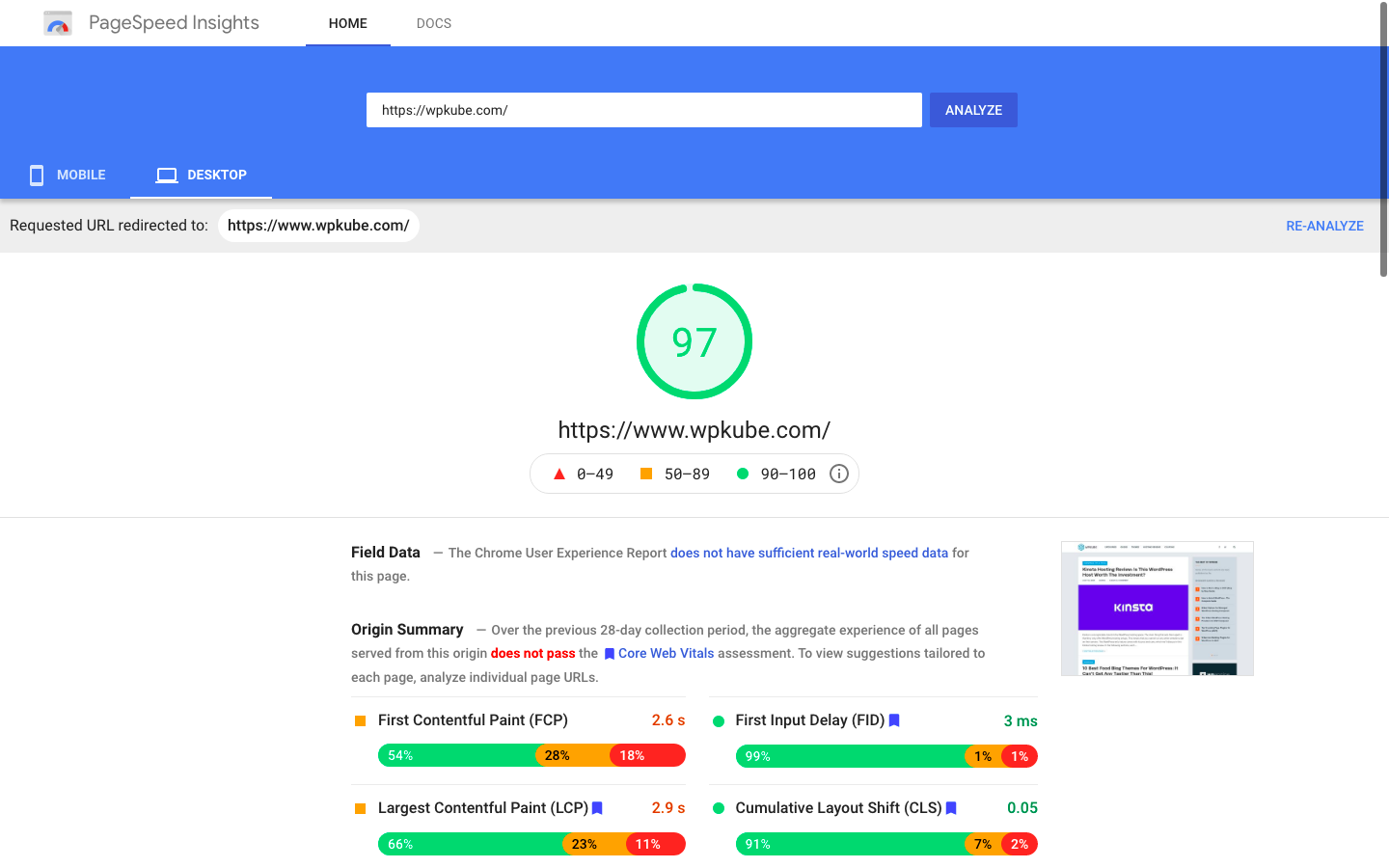
The tool is worth checking out if you want an objective opinion on how fast your page load time might be and it’s the best way to find out what could be slowing down your WordPress site.
There are some other page speed tools you can try out too – WebPageTest is the most flexible, but Pingdom and GTmetrix are also popular. Try running the tests a few times at different times of the day to get a true picture of the average load time of your site. We also recommend testing with different devices and from different locations (if you have a global audience).
You can then use this as a benchmark to compare against when you’ve made speed improvements.
What is Slowing Down Your WordPress Site?
If you’re getting a score in the orange or red zone on Google Page Speed Insights, there is some room for improvement. But what exactly might be causing your site to load slowly?
You should get an idea from your Page Speed Insights report but it won’t give you the full details. There are probably several factors that are increasing your page load time slightly, all of which can add up to a big difference.
Some of the most common culprits for WordPress sites include:
- Slow hosting server
- Large, uncompressed images
- Bloated themes
- Badly coded theme and plugin files with inefficient coding practices
- Too many plugins
- Inactive or poorly optimized widgets and menus
- Too many adverts or external scripts on the page
- Slow-loading third-party embedded content such as YouTube videos or social media feeds.
- Inefficient WordPress configuration
Now you have an idea of what might be slowing down your site, you can take steps to reduce your site’s loading time. Some require a moderate amount of technical knowledge, while others just need some simple updates and changes.
How to Speed Up WordPress In 17 Steps
Now that you have an understanding of how your site is currently performing, let’s go through an actionable guide for how to speed up WordPress and achieve those benefits that we discussed above.
We’re going to order this as a step-by-step guide, but we’re going to put the most important performance tactics first.
If you implement just the first five tactics, your site should already perform quite well already. If you don’t care about perfect optimization, you might want to just stop there. However, if you want to go even further, you can continue through the other steps to speed up WordPress even more.
1. Use Fast WordPress Hosting
When you’re running a WordPress site it’s important to choose a host that optimizes their server configuration for WordPress.
All of the other tips on this list can help you create a faster WordPress site. But if your hosting sucks, your site will still load slower than it could on fast hosting.
Many hosts offer WordPress hosting these days but take the time to look through their features. If they’ve made the effort to optimize for speed and performance, they’ll let you know about it.
Even the most basic shared hosting will be sufficient for low-traffic sites with few pages. But once your site grows larger and you start getting significant traffic, you should upgrade.
Shared hosting is cheap but can be slow because you share the server resources with many other sites. A better option for bigger sites is a scalable cloud hosting plan with dedicated resources.
Even once you’ve optimized your WordPress site, you’ll need to spend time on maintenance regularly to make sure it’s running smoothly. Managed WordPress hosting costs a little more but it’s well worth the investment to help your website run fast and stay secure.
Managed WordPress hosts also usually implement many performance optimization tactics at the server level, such as server-level caching and a built-in CDN.
Popular options here are Kinsta (our review), WP Engine (our review), or Flywheel (our review).
👉 Check out our guide to the best WordPress hosting for a roundup of some of the best choices for shared and managed hosting for WordPress sites.
2. Install a Caching and Performance Plugin
Beyond using fast hosting, the next best thing you can do for your site’s performance is to use a caching and speed optimization plugin.
These plugins usually do two things:
- If your host doesn’t already implement page caching at the server level, these plugins can implement page caching for you. This will greatly speed up your site’s load times by eliminating the need to dynamically process PHP for each visit.
- They optimize your site’s code to speed it up as much as possible. For example, they can remove unused CSS and delay loading certain JavaScript files until a user starts interacting with the page.
You can find tons of performance plugins. Some focus just on caching, while others take an all-in-one approach.

If you’re willing to pay for a premium plugin, we think WP Rocket is the best all-in-one performance plugin for these reasons:
- It covers all aspects of performance, including some unique features to optimize your site’s CSS and JavaScript for Google’s Core Web Vitals metrics. For example, WP Rocket lets you automatically remove unused CSS on a page-by-page basis, which most other performance plugins don’t offer.
- It’s beginner-friendly and has an excellent interface that explains each setting in detail.
- You get support directly from the developer if you have any issues.
- It offers built-in integrations for most popular web hosts and plugins. For example, it has automatic compatibility with WooCommerce.
👉 WP Rocket costs $49 for use on a single site – you can learn more in our WP Rocket review.
If you’re on a tight budget and looking for a free option, you can also consider plugins like W3 Total Cache, Autoptimize, Hummingbird, and others at WordPress.org. However, these plugins won’t quite match the functionality and ease of use that WP Rocket offers.
3. Optimize Your Images
On average, images account for around 50% of the file size of the average web page. That means you can make a big improvement to your site’s load times if you optimize your images for performance.
As of WordPress 5.5, WordPress supports native browser lazy loading for images, which already makes a big improvement to your site’s performance by waiting to load below-the-fold images until a user starts scrolling down.
However, it’s still good to optimize your images’ file sizes so that they load quickly once a user starts scrolling. It will also speed up your initial load times if you’re loading images “above the fold”, such as featured images in a blog post.
The easiest way to optimize your images is to use a dedicated WordPress image optimization plugin.
These plugins will automatically compress and resize your images as you upload them to WordPress. Plus, they can also help you implement other useful tactics such as WebP format conversion.
👉 We have a whole post on the best image optimization plugins. If you’re in a rush, we think the freemium ShortPixel plugin is a great place to start.
The free version will work for small sites and the premium version is still quite affordable.
4. Use a Lightweight Theme
As your site’s foundation, your site’s theme can play a big role in its performance.
Bloated themes will load a lot of scripts and code that will slow down your site, while performance-optimized themes will keep things as lightweight as possible.
Nowadays, there are a lot of high-quality multipurpose themes to choose from that have a focus on performance. Here are some of the best:
- GeneratePress – our GeneratePress review
- Astra – our Astra review
- Neve
- Kadence – our Kadence review
- Blocksy
You can find some other high-quality options in our collection of the best WordPress themes.
If you’re building a fresh site, use one of these themes from scratch. And if you’re already using a bloated theme, switching to one of these lightweight themes should make a big improvement to your site’s load times.
5. Use The Latest PHP Version
WordPress is coded in PHP along with the plugins and themes you use on your site. Newer versions of PHP can handle more requests per second so if you’re using an outdated version of PHP, your site might be running slower than necessary.
At the time of writing, WordPress recommends that you should be using at least PHP version 7.4. If you’re using an older version, you’ll get a warning in your dashboard.
You can only use the versions of PHP that are available on your web server so you’ll usually have to contact your hosting company if you want to use a more up-to-date PHP version. This is another good reason to choose your web hosting carefully, as good hosts will ensure they’re always running the most recent stable version of PHP.
Always remember to backup your WordPress site before you change the PHP version or make any other major changes!
6. Avoid Bloated WordPress Plugins
If you’re familiar with WordPress, you’ve probably seen people say not to use too many plugins because “using a lot of plugins will slow down your site”.
This actually isn’t quite true. It’s not the total number of plugins that matters, but rather the “weight” of the plugins that you’re using.
For example, you could have 50 small, lightweight plugins that have very little impact on your site’s performance but then have one bloated plugin that slows down your site.
So rather than focusing on limiting the total number of plugins that your site uses, focus on limiting the number of “heavy” or “bloated” plugins that your site uses.
Unfortunately, if you’re not a developer, it can be tough to tell if a plugin is “heavy” or “lightweight”, which is why a lot of people opt for the simplicity of just saying “try to use as few plugins as possible”.
However, here are some tips that you can use to try to see if a plugin is heavy or not:
- Read the reviews. Oftentimes other people will have done the work for you to tell you if the plugin has a negative effect on performance.
- Read the marketing copy. While you shouldn’t take a developer’s word as gospel (remember, it’s marketing copy), you can usually get a good idea of whether or not a developer emphasizes performance by reading the copy. For example, if you look at the Novashare plugin, you can see that it’s built for performance.
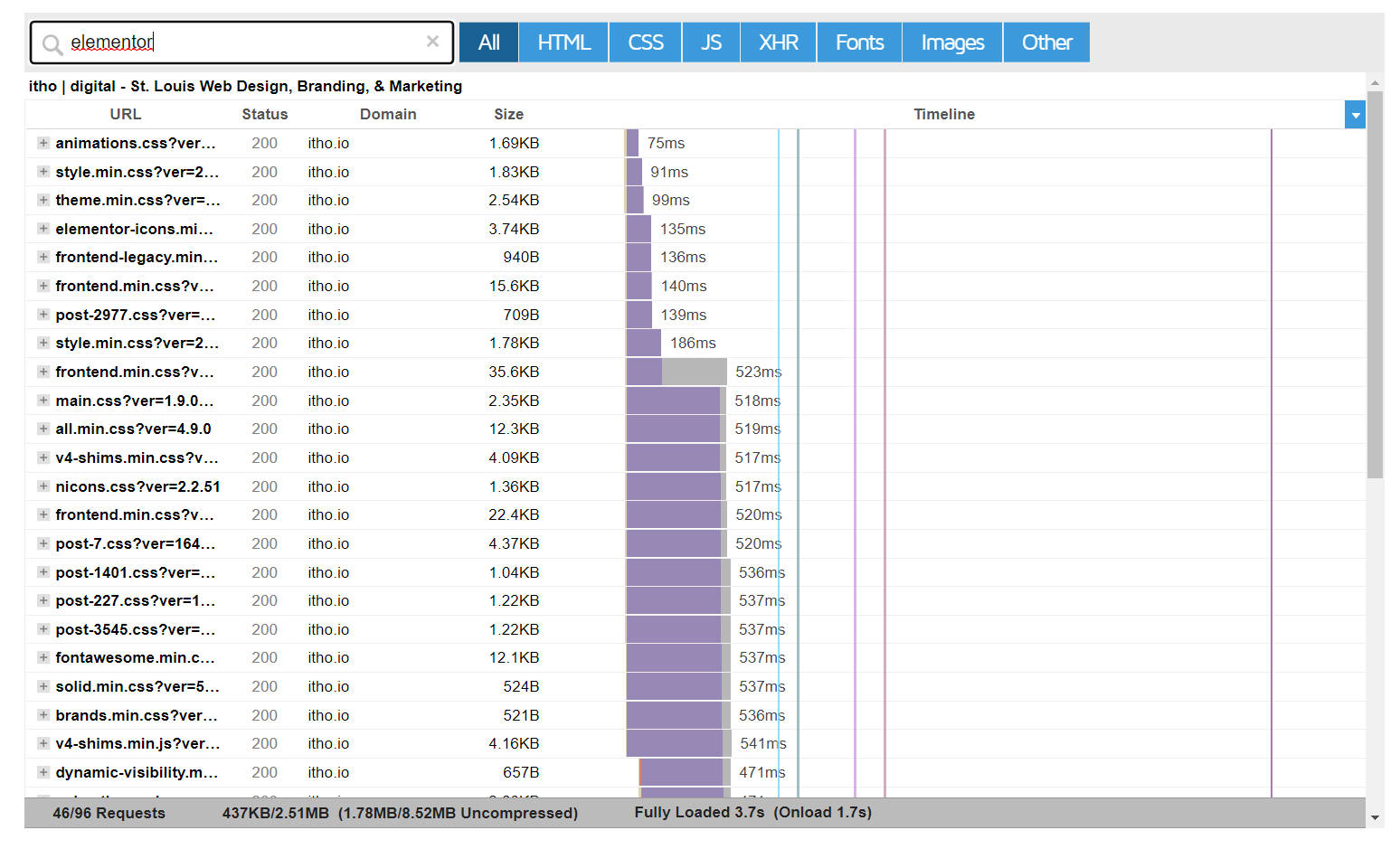
- Use a waterfall analysis. View the waterfall analysis in a tool like GTmetrix and filter out HTTP requests from the plugin.
- Use the Query Monitor plugin. This can help you detect slow/heavy database queries from a plugin.
Here’s an example of using GTmetrix’s waterfall analysis to see the scripts that a plugin loads:
And one rule that is true is that you should never add unnecessary plugins to your site. Make sure that every single plugin you use serves a real purpose and adds value to your site.
7. Manually Disable Scripts Where Not Needed
This is a somewhat advanced tactic, so we don’t recommend that casual users try it.
However, for more advanced users, another useful tactic is to take manual control over the scripts that load on each page and disable those when not needed.
For example, maybe you use WooCommerce as the payment processor for your membership site. By default, WooCommerce will load its scripts on every page. But for this use, you really only need to load them on the payment page. To optimize performance on the rest of your site, you could manually disable the WooCommerce scripts everywhere else.
To access this functionality, you can use a plugin like Asset CleanUp (freemium) or Perfmatters (premium only).
8. Keep Your Site and Plugins Updated
Keeping your WordPress installation, themes and plugins updated is the best way to make sure you have all the latest security patches and code optimizations.
Just as an outdated theme can slow down your site, an old version of WordPress or a non-optimized plugin could also be causing issues.
Make sure you install any updates as soon as they’re available. If you have several sites and find this difficult to manage, you might want to consider using managed WordPress hosting to do it for you.
If a plugin you’re using hasn’t been updated in a year or two, you might want to consider replacing it with an alternative.
9. Use a Content Delivery Network (CDN)
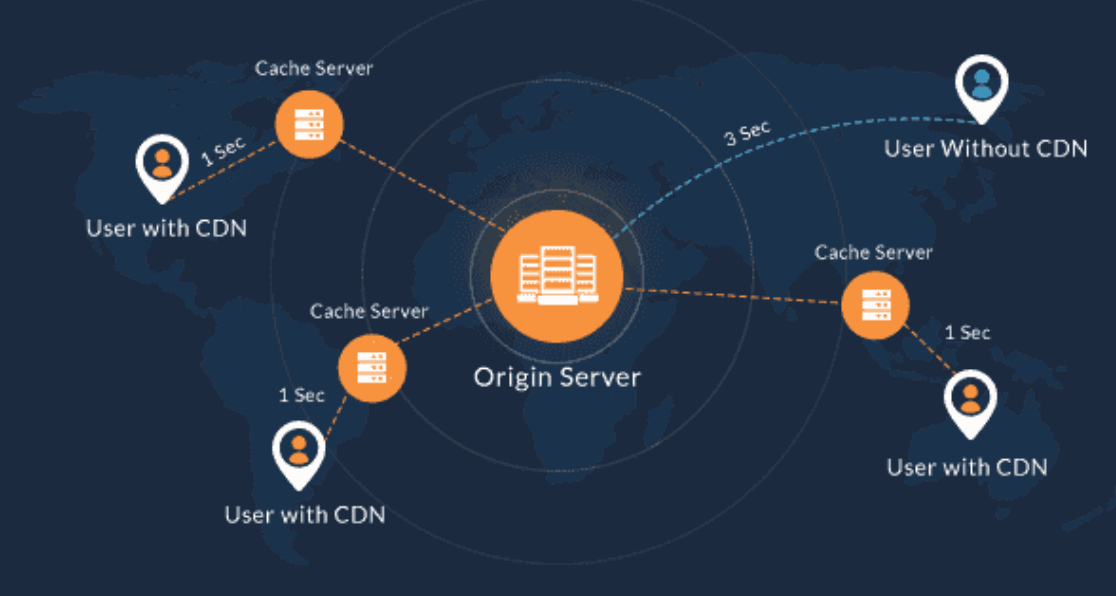
CDN stands for content delivery network. These are servers that store copies of your site’s files and serve them to visitors from the closest location possible, usually a data center close to where they’re located.
This can significantly speed up page load times especially on slower connections or high-traffic sites by reducing the distance that files have to travel to the user’s browser.
It’s especially useful if your site has a global audience with visitors from all over the world. If you only target a specific area (like your local city), you probably won’t notice much improvement.
👉 There are a number of CDN providers and you can read our guide on the best free and premium CDNs for WordPress for more help with choosing one.
10. Display Post Excerpts on Your Homepage and Archives
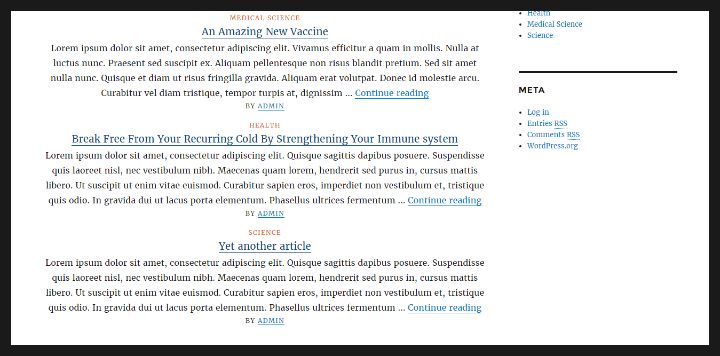
The more content that is on a page, the longer it will take to load. If you’re displaying full posts on your homepage and archive pages, you can speed these pages up significantly by setting WordPress to show a short excerpt instead.
This is a great way to make sure the most important content on your site loads quickly without sacrificing too much of what you want people to read.
Simply go into the WordPress Settings > Reading section in your admin dashboard and in the section labeled “For each post in a feed, include” choose the “Summary” option instead of “Full text”. You can also reduce the number of blog posts that are displayed.
11. Pagify Your Comments
Splitting your comments section into pages is a great way to improve the speed of posts that have a lot of comments.
There’s no need for a plugin or complicated code editing to do this. You can simply edit the setting in your WordPress dashboard.
Go to Settings > Discussion and tick the box next to “Break comments into pages”. You can also adjust the number of comments that are displayed on each page.
You should also make sure you’re stopping spam comments from getting through to your site by using a plugin like Akismet.
12. Host Video and Audio Files Externally
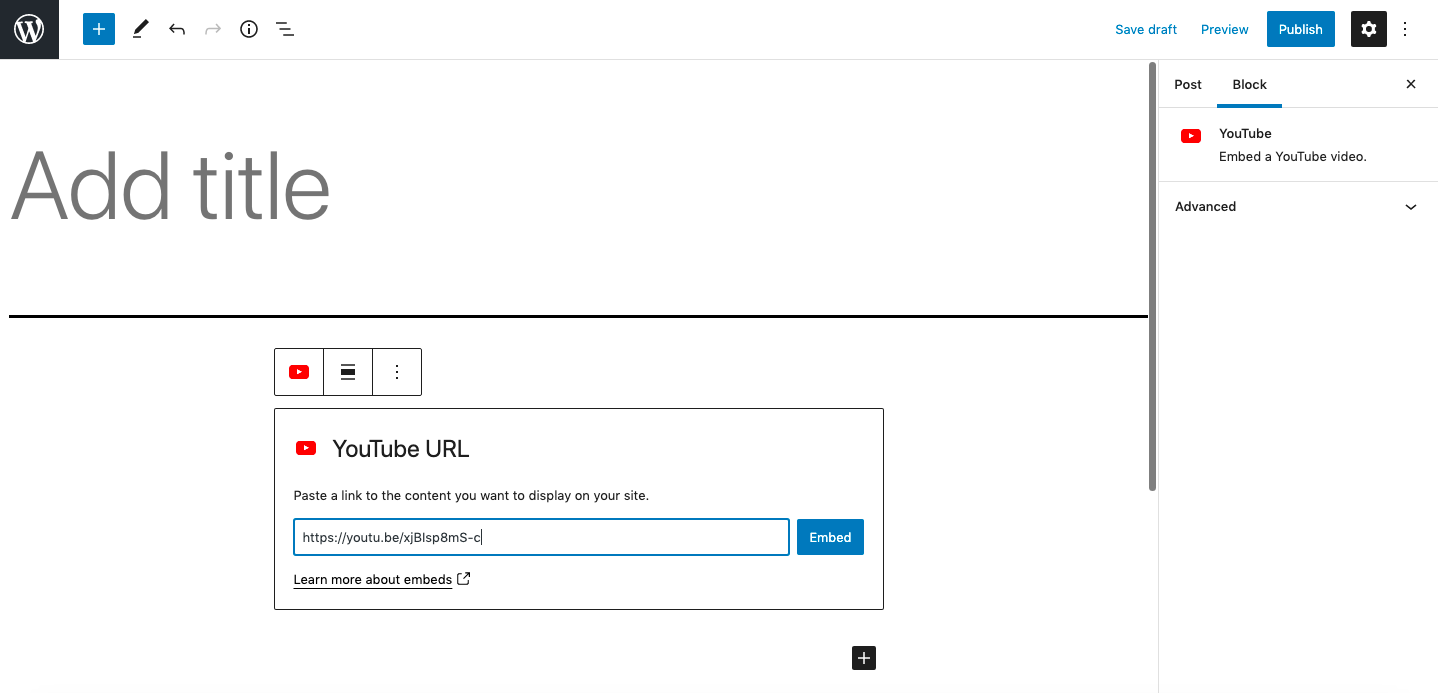
You can upload videos and audio files directly to WordPress but this is very bad for performance. Uploading these types of files to an external hosting service like YouTube or Vimeo will drastically improve your site’s speed.
You can then use the video embed block to display your video content in your post as normal. This also provides a better user experience as video hosting sites are optimized for smooth playback, even on slow connections.
13. Activate Lazy Loading for YouTube Videos and Other Embeds
Lazy loading is a technique used to improve the speed of your site by loading content gradually. As users scroll through, more items come into view.
We already talked about lazy loading for images in the images section. However, if you’re embedding a lot of YouTube videos or other iframe embeds from third-party services, you’ll also want to make sure you’re lazy loading them in an optimal way.
If you’re using the WP Rocket plugin, it already includes dedicated lazy loading for YouTube videos and other embeds – just make sure to enable it in the Media settings. If not, you can use the free Lazy Load plugin.
14. Optimize Your WordPress Database
One of the most important things you can do is to clean up your database (or optimize it). WordPress creates a backup copy of each post, comment, and other content in case something goes wrong. These backups are stored on your server as what’s called revisions.
Old plugins and themes can also add records to your database that don’t always disappear when you uninstall them.
Over time, all this extra data from spam comments, post revisions, and remnants of all plugins can make your database unnecessarily large and slow.
You can clean up your WordPress database manually but you should only do this if you’re comfortable and know what you’re doing.
The easier option is to use a plugin like WP-Optimize or Advanced Database Cleaner that can do this for you automatically.
15. Limit Post Revisions
One of the options you have for limiting your database size is to change how many revisions WordPress stores.
This will vary depending on your site’s activity but in general, it’s a good idea to store at most two or three post revisions so that there isn’t too much old data stored away.
By default, this number is set to unlimited revisions but if you’re editing posts a lot, you could free up a lot of database space by limiting revisions to a set number.
To do this, you need to edit your wp-config.php file, which you should find in the root folder of your website when you log into the FTP server.
Add the following line of code to the file, changing the number to the number of revisions you want to store:
define( 'WP_POST_REVISIONS', 3 );
16. Split Long Posts Into Pages
If you have a lot of long-form content on your site, it could take a long time for these pages to load, especially if they contain a lot of images. You can speed them up by splitting your long posts into multiple pages.
To do this, you can use the Page Break block where you want to content to be split onto a new page or enter the tag <!–nextpage– > if you’re using the classic editor.
17. Protect Your Site From Hotlinking and Brute-Force Attacks
One of the biggest threats to a site’s speed, and one that you may not have thought about before, is hotlinking.
Hotlinking occurs when someone else uses your images without your permission on their own website or blog post. They do this by copying and pasting an image URL from your site onto theirs.
The easiest way to prevent hotlinking is by using a security plugin like All in One WP Security and Firewall.
This plugin has a number of security features that can protect your site. It also protects you from brute-force attacks, which is when a hacker runs a script trying out hundreds of passwords in order to gain access to your site.
Brute-force attacks are not only a worry when someone manages to get into your site. The repeated requests to the server also cause it to slow down.
If you want even more protection, check out Sucuri’s SiteCheck service, which gives a full checkup on your site and will detect any potential threats that might be affecting its speed or security.
Speed Up Your WordPress Site Today
Many of these techniques can help improve conversion rates and provide a better user experience as well as speeding up your site so it’s well worth taking the time to optimize your site.
Don’t forget to go back to your site speed test tool of choice and see how much improvement you’ve made by making these changes to your site.
For more ideas and detailed guides for improving your WordPress site check out some of our other articles such as the best SEO tools and plugins for WordPress, and take a look at all the tools we use to run WPKube including hosting, plugins, and more.








Nothing is missing in this article. Without a doubt compression and caching are way to go. As well as reducing number of plugins and cleaning up database periodically.
I agree. Caching is probably the quickest and easiest way of speeding a website up.
Nice article, though I see a few things that are missing such as selective plugins/assets loading. This can dramatically increase performance in some pages but to my surprise it’s often overlooked by many people. There are 2 free plugins that if used wisely can make the page load much faster:
1) To select plugins that will not load on specific page (e.g. Contact Form 7 loads its CSS and JS in all pages when you might need it only on the Contact page) you can use “Plugin Organizer” plugin.
2) Sometimes, you need to have a plugin enabled on a page but it’s loading 10 assets and you will only need 5 of them on that particular page. To filter the .CSS and .JS that is not needed you can use “WP Asset Clean Up”
Nothing is missing in this article.
Thank!
Glad you liked it.
Thanks for the valuable points. I was thinking of getting rid of the revisions in a post. Your code helped a lot. And the caching plugin has simply improved my site score in Google Page Insight.
Thats a pretty comprehensive list right there 🙂 Very impressive and a lot of good information. I use all the points you raised except I have not yet delved into the world of CDN. I want to have a go at setting it up sometime soon though as it makes a lot of sense. Thanks for the article Kevin. Good work
Some people state that a CDN is not needed, but most performance testers recommend it, so there are definitely lots of benefits to using them.
Glad you liked the post 🙂
Kevin
Hi Kevin,
Thanks for sharing this post. You have covered everything, but I felt you could have also talked about compressing the website using Gzip.
Hi Shounak,
I was only asked to write a limited number of words, so I had to pick and choose what was left in and what was left out. As such, this post should be considered an overview of the subject rather than a comprehensive guide.
Though I do think that there is not too much to Gzipping. It is one of the best things to do, but apart from enabling gzip through WordPress and ensuring your host supports it, there is nothing else to do. It just takes care of itself. 🙂
Kevin
Superb tips. Fast loading sites have better ranking and less bounce rate. We should use plugins which have multiple functions , it can reduce number of plugins we use.
I really enjoyed reading your information. I read everything because i was learning a lot from it. Thanks a lot for this!
I always enjoy your posts Kevin (wherever they are published). 😉
Although a condensed post (targeted to the end-user, so there was no code perspective), it’s an excellent one!
I recently completed a project for a client turning his grades from E to A (minimizing loading time to under a second) with many of the practices you suggested in my “tool-set”. (Although he didn’t wish to change his theme and host -sigh!)
I was just about to write a case study when the “WhiP” informed of your post.
Excellent work as always!
Thanks for the kind words Natalia. Glad you enjoyed the article.
Hi Kevin/Ragnar,
This was a great post to read and I’ve bookmarked it for reference. I’m working through a few of these points already and noting the impact they are having.
The last few weeks I’ve been focused on Image Optimization as its something free and easy to do yourself.
Next up will be the CDN and Caching Tools!
Thanks again!
– David
You will see a huge difference once you introduce caching and integrate a CDN.
Best of luck 🙂
Kevin
One of the best articles on WordPress I’ve ever read – very impressive. Bookmarked – you better believe it!
I didn’t knew about post revisions and BJ lazy load.Thanks a ton. 🙂
Thanks for great articles but I think there is lack of information how to speed up WordPress website without removing plugins because I’m pretty sure most of people have minimal amount of plugins already installed.
Here’s premium plugin which controls conditional unloading of CSS and JS:
Gonzales WordPress plugin
Another great post/article. I just came to WPkube and I am liking the content already. Nice job!
So glad to hear that, Mark. Thanks for the nice words :).
If you ever need any WordPress related help or have any questions, feel free to reach out to me via our contact form page.
Hi Kevin, great tips. Especially liked the one about removing unneeded plugins, this actually made the biggest difference in speed for me. Next to Pingdom and GTMetrix, do you know of any good online tools to test website speed with? I found http://www.webpagetest.org and http://www.giftofspeed.com and they are decent but I’m looking for more in-depth analysis. Also, is there benchmarking software for websites available? Anyone reading this can answer too if they know. Thanks! Megan
Hey Megan,
Glad you found Kevin’s article useful. Removing unnecessary plugins can have real impact on your site speed. Another thing you can do is to disable unnecessary scripts that aren’t needed on homepage. It can be done wit the help of Gonzales plugin — http://tomasz-dobrzynski.com/wordpress-gonzales
Regarding the tools for performance deep analysis, I think GTMetrix is the best free option out there. You could also try LoadStrom and WP Performance Tester.
Hope this helps.
Another good article. Covering everything needed to speed up WP site. I personally enhanced my site performance just by using CDN, minification, caching and image optimization.
Got my site from 27 seconds to 23!.. still a horrible score and working on figuring out a few of your other tips.