

Worried about WordPress security?
You should be! But don’t worry too much – if you implement some WordPress website security best practices on your site, you can feel confident that your site won’t experience issues.
WordPress is secure. But the actions that users take (and the plugins that users install) can introduce all kinds of WordPress vulnerabilities.
To avoid making those mistakes, all you need to do is follow the tips in this post.
To make this post as actionable as possible, we’re going to divide our WordPress security tips into two categories:
- 7 must follow WordPress security best practices – every single WordPress user needs to do these things no matter what.
- 12 additional WordPress security hardening tips – these tips are not absolutely essential, but they can add extra hardening to your site to give you peace of mind.
❗Seven MUST-FOLLOW WordPress Security Best Practices
If you take nothing else from this post, I recommend that you implement at least these seven WordPress security best practices on your site.
If you aren’t doing these seven things, you’re opening your site to huge vulnerabilities.
1. Apply Core and Plugin Updates ASAP
One of the absolute best things you can do to keep WordPress secure is to always promptly apply updates to the WordPress core, plugins, and themes.
No matter how great a piece of software is, it’s natural for new vulnerabilities to be discovered. However, with a quality development team, these vulnerabilities will be fixed before they can be exploited by malicious actors…as long as you promptly apply the updates!
So many of the most recent widespread WordPress exploits could’ve been avoided if people just would’ve updated their sites.
To be alerted to new updates, pay attention to the Dashboard → Updates area in your WP admin.
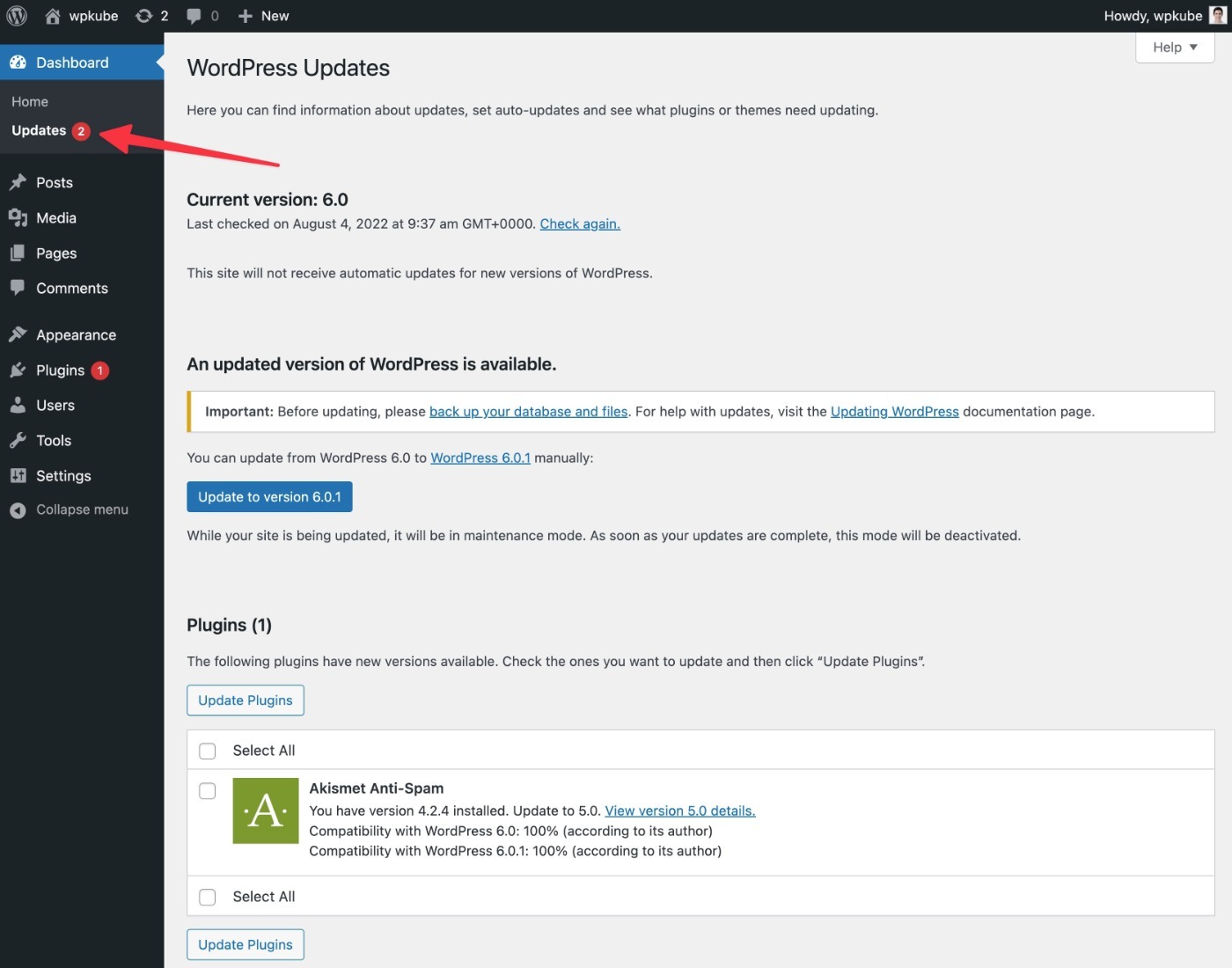
If you’re worried about compatibility issues, you can test updates on a staging site before applying them to your live site. You’ll also want to take a backup before applying updates – more on that later.
Note – the one exception to this rule is major updates, which are solely focused on adding new features and don’t include any security fixes. You can safely wait a few weeks to apply these major updates.
- Major release (features) – 5.0, 5.1, 6.0, etc. – you can wait to apply these updates.
- Minor release (security/bug fixes) – 5.0.1, 5.1.2, 6.0.4, etc. – you ALWAYS need to apply these ASAP.
2. Only Use Plugins and Themes from Reputable Developers (and No Nulled Plugins)
While the core WordPress software is secure, the same cannot be said of every single plugin and theme out there (mostly plugins).
By adding new code and modifying the functionality of your site, plugins can introduce all sorts of vulnerabilities.
At the same time, not using plugins isn’t really an option as plugins are an integral part of every WordPress site.
Consequently, it’s important to focus on only using plugins and themes from reputable developers with a track record of good code quality and prompt maintenance.
That is, be careful about which plugins you install on your site.
Here are some tips to help you only use high-quality plugins and themes:
- Read the reviews. Poor reviews might indicate bad code quality.
- Check the active install count. While this isn’t a hard rule, popular plugins are generally more likely to receive attention.
- Check for recent updates. Having an active developer is important to patch any newly discovered vulnerabilities.
- Don’t install unnecessary plugins. Because every plugin that you install is a potential attack vector, you should only install plugins that are important to your site.
We also have a full guide on choosing WordPress plugins.
Finally, you’ll also want to avoid nulled plugins because you don’t know what code has been added to the plugin.
3. Use Secure WordPress Hosting
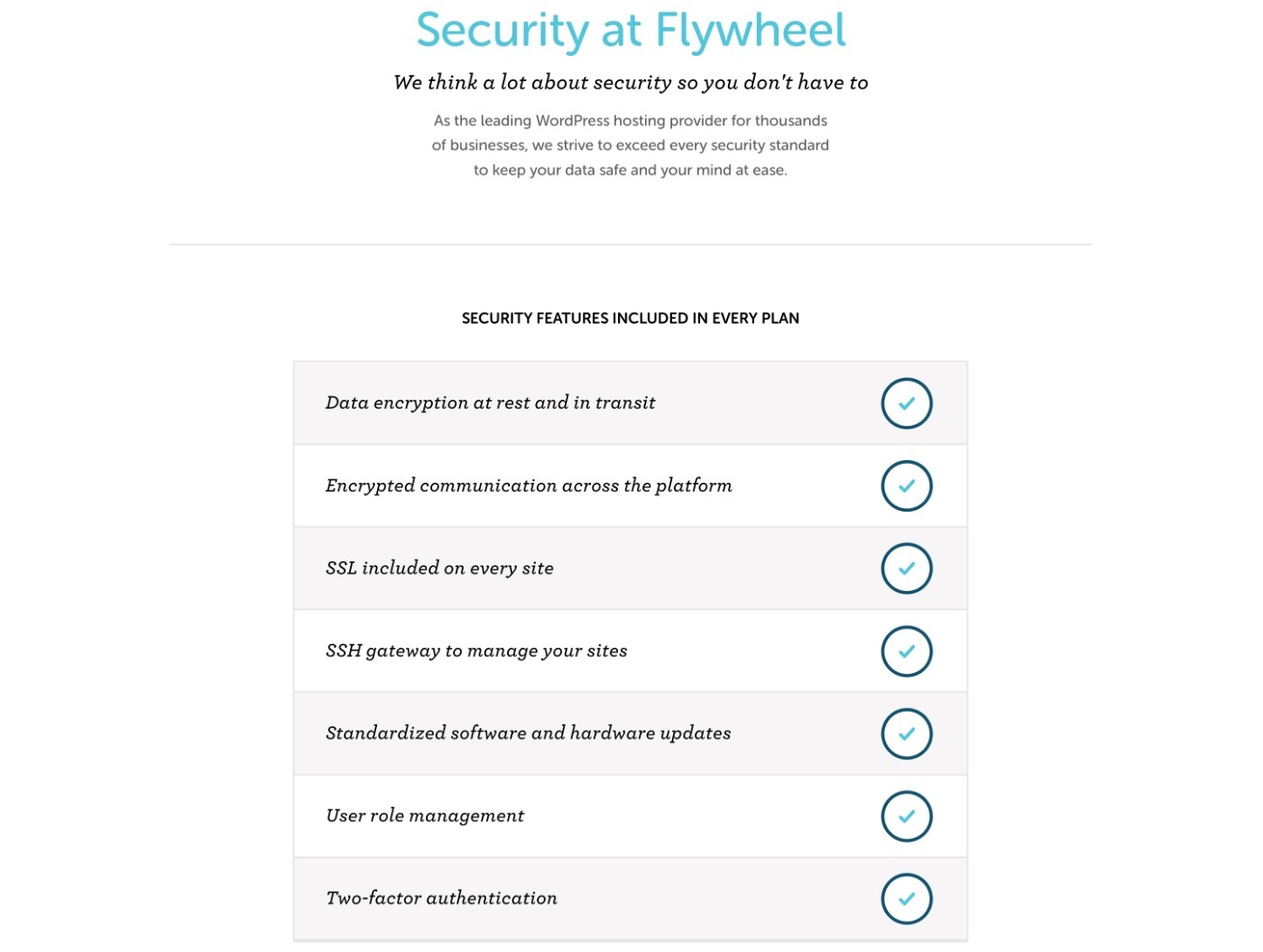
Choosing a quality WordPress hosting provider can go a long way toward ensuring your site’s security.
First off, a quality WordPress hosting provider will ensure that your environment is optimized for WordPress security, such as proper file permissions and a secure wp-config.php file.
Many WordPress hosts will also build in more proactive protections, such as built-in firewalls or malware scanning.
Some managed WordPress hosts will even clean your site for free if anything does happen to it.
Basically, with a quality host (especially a managed WordPress host), they’ll take care of a lot of these best practices so that you can just focus on growing your site.
To find some quality options, check out our posts with the best managed WordPress hosting and the best WordPress hosting in general.
If you can afford it, consider options like Flywheel (what we use for WPKube – our Flywheel review) or Kinsta (our Kinsta review).
4. Lock Down Your Login Page and Account Access
All the WordPress security tips in the world can’t help you if a malicious actor is able to gain access to one of your legitimate WordPress user accounts (especially an admin account).
Think about it in the real world – you could have the absolute best home security system in the world, but it’s not going to do anything if a robber has your house key and security code.
That means it’s essential that you find ways to protect your WordPress site’s login process and user accounts.
To start, you’ll want to use strong account credentials:
- Username – never use “admin” as the username. Instead, choose a unique username that you don’t use anywhere else.
- Password – use a strong, unique password. For best results, use a password manager like LastPass or Bitwarden to generate unique passwords for each site.
Beyond that, you can also use tactics to protect the WordPress login page:
- Change the login URL – this also cuts down on a lot of bot traffic. How? Use the free WPS Hide Login plugin.
- Limit login attempts – temporarily block an IP address if it makes too many incorrect login attempts (just like how banks do). How? Use the free Limit Login Attempts Reloaded plugin.
- Require two-factor authentication (2FA) – make people enter a code from an authenticator app, SMS, or email in addition to their credentials. How? Use free plugins like WP 2FA or Two-Factor.
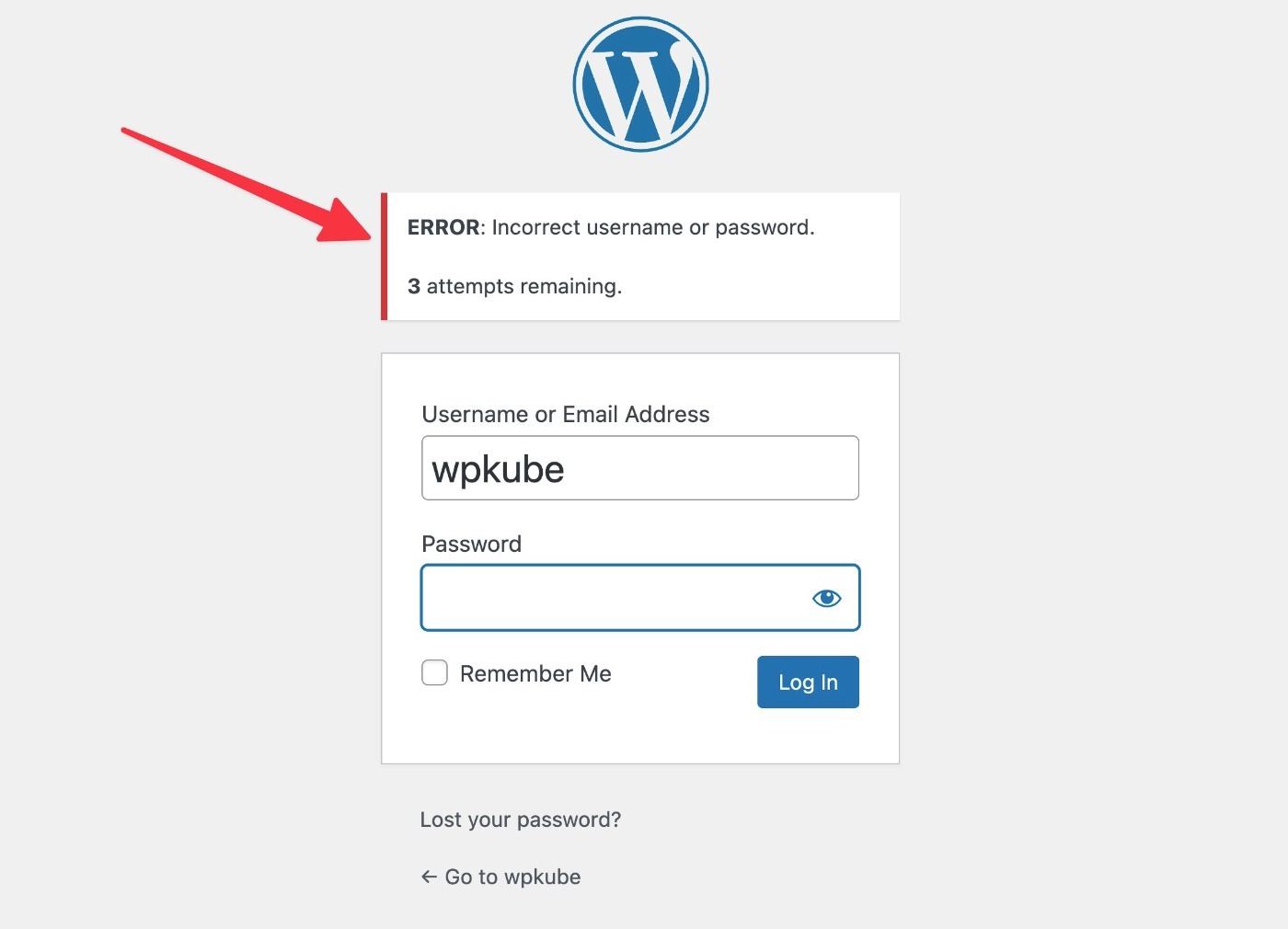
All sites should change the login URL and limit login attempts, but using WordPress two-factor authentication is really only needed for mission-critical sites.
5. Install an SSL Certificate and Use HTTPS
An SSL certificate lets you use HTTPS on your site instead of HTTP.
With HTTPS, any data that passes between your browser and your server is encrypted. Beyond just generally being good for privacy, this is essential for protecting important data such as your username and password.
Without HTTPS, a malicious actor on your internet network can see all of the data that passes between your browser and your site. For example, if you log into your site at your local coffee shop using HTTP, someone on that network would be able to see your username and password in plain text.
When you use HTTPS, though, your username and password (along with all other data) are securely encrypted, which means that malicious actors would only see a bunch of random characters.
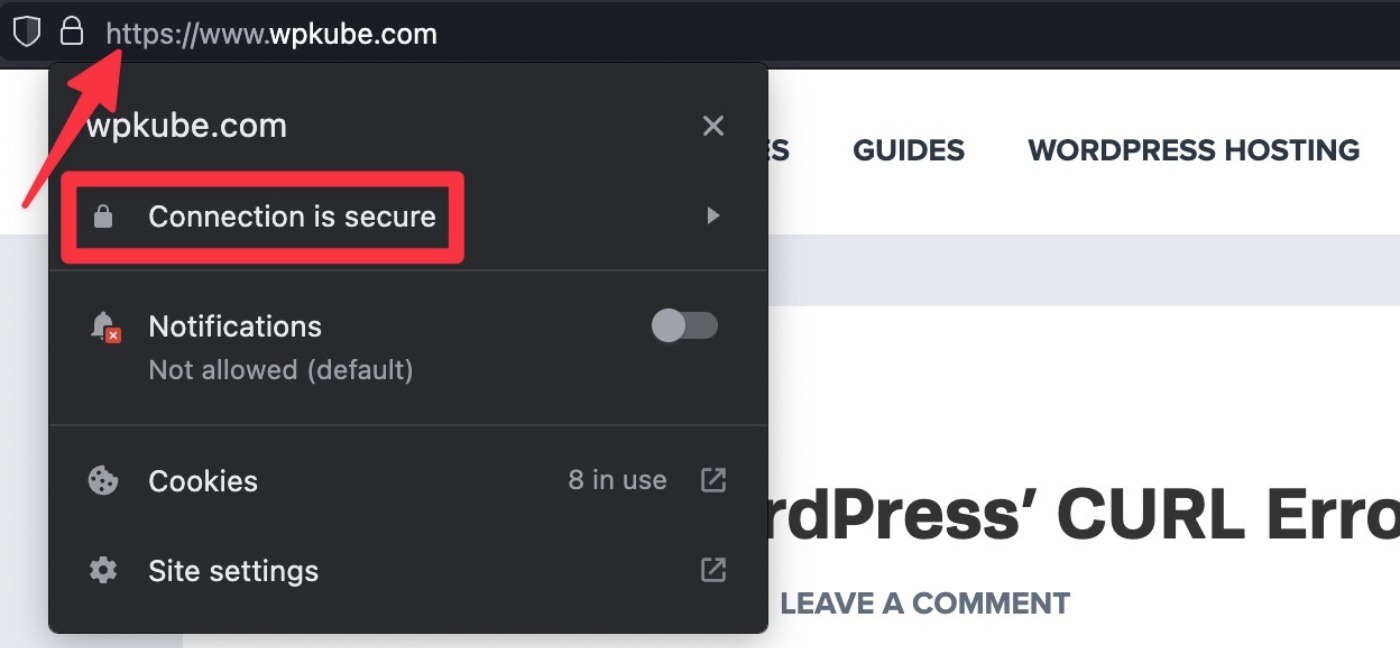
Nowadays, most quality WordPress hosting providers offer free SSL certificates.
Once you install an SSL certificate via your hosting dashboard, you can configure your site to use HTTPS. If you need some help moving your site to HTTPS, the free Really Simple SSL plugin offers a one-click setup.
Follow our WordPress HTTPS guide for more details.
6. Use Supported PHP Versions
WordPress is written in the PHP programming language. However, there are different PHP versions that you can use on your hosting account.
Older versions of PHP no longer receive maintenance, which means they can have unpatched security issues.
As of 2022, the oldest PHP version receiving security updates is PHP 7.4. However, starting in 2023, you’ll want to be using PHP 8.0 at a minimum.
You can check current PHP version support on this page.
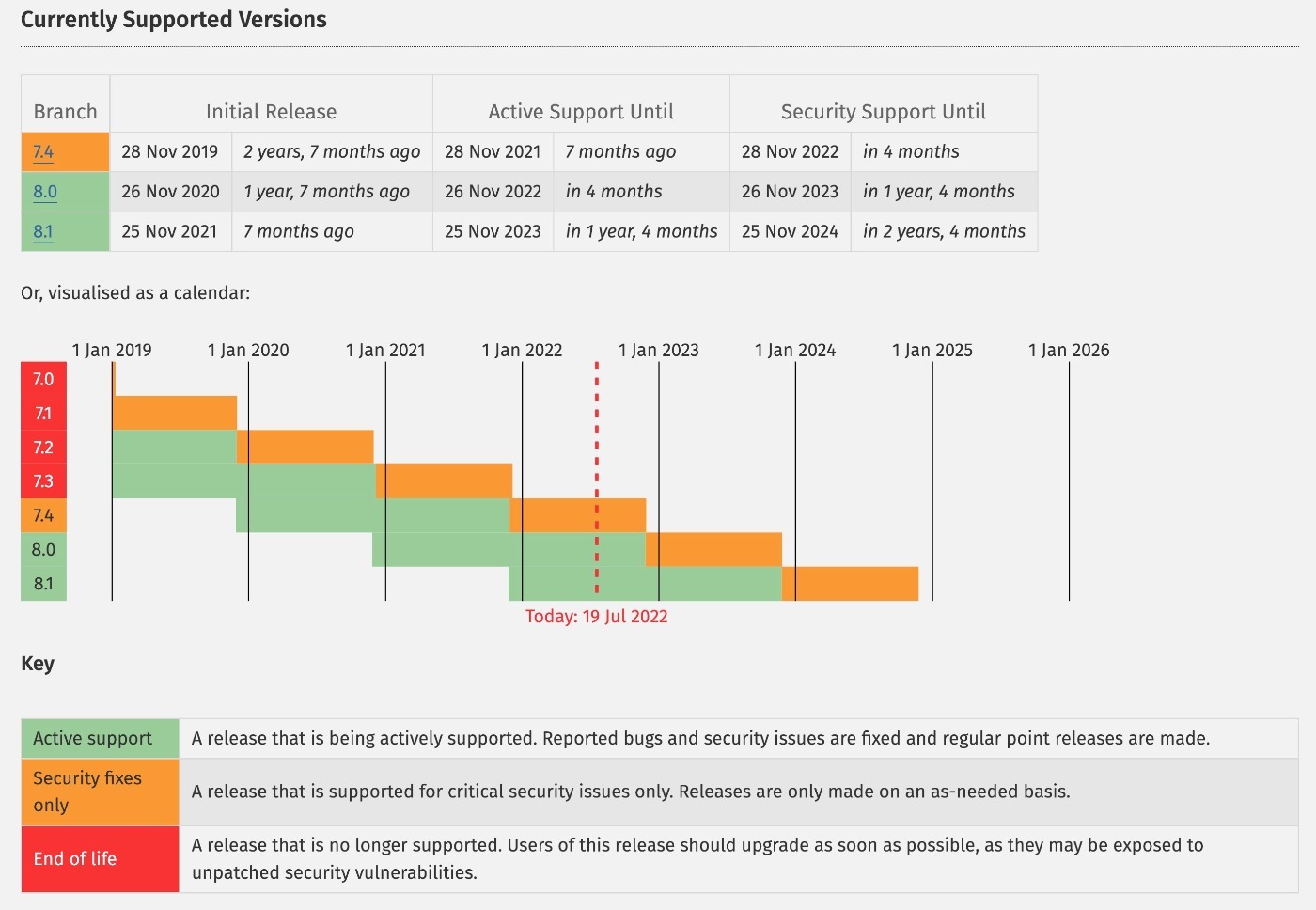
As an added bonus, newer versions of PHP also offer big performance improvements, which means your site will load faster in addition to being more secure.
If you’re not sure how to update PHP, you can ask your host’s support. We also have a guide on how to update PHP at popular WordPress hosts.
7. Back Up Your Site Regularly
Backing up your site will not prevent security issues from happening on your site. However, it will prevent security issues from turning into larger problems.
Without a backup, any security incident on your site can be absolutely devastating. You might lose data, have lots of downtime, and so on.
With a recent backup, though, the worst case of a security incident is usually that you just need to restore the clean backup of your site. Still annoying – but a lot less catastrophic.
If your host doesn’t already offer secure automatic backups, paid tools like Jetpack Backup or BlogVault offer the simplest way to enable secure, off-site backups.
If you don’t have the budget to pay for a tool, UpdraftPlus is also a great free option – just make sure to connect it to an off-site storage provider such as Google Drive or Amazon S3.
Here’s our full post on the best WordPress backup plugins.
Twelve Additional WordPress Security Hardening Tips
If you faithfully implement the must-follow WordPress website security best practices above, you will avoid 99% of issues on your site.
However, if you want to beef things up even further, there are some additional hardening tips you can implement to further protect your site.
8. Set Up a Firewall
A firewall can proactively protect your site from threats by blocking malicious traffic or actions before they can affect your site or server.
Many hosts already implement their own firewalls, which is why this might not be a must-have for sites if you’re using quality WordPress hosting (see above).
If your host doesn’t (or if you want more protection), you can add a firewall at the application level with a plugin like Wordfence or at the DNS level with a service like Cloudflare or Sucuri.
9. Use a WordPress Security Plugin
You can create secure WordPress sites without a dedicated security plugin, so a security plugin is definitely not required to create a secure site.
With that being said, a security plugin can still be handy for a few reasons:
- Security plugins can offer real-time firewalls to protect against emerging threats.
- A quality security plugin will make it easy to implement a lot of the other hardening tips on this list, which can simplify things for you and save you time.
When in doubt, the Wordfence plugin is a great option to get started with. You can find more options in our full collection of the best WordPress security plugins.
10. Hide WordPress Version
Hiding the WordPress version number adds a negligible amount of “security by obscurity” by making it slightly harder for malicious actors to detect your site’s version number.
To hide it, you can add the following code to your child theme’s functions.php file or a plugin like Code Snippets.
function wp_version_remove_version_number() {
return '';
}
add_filter('the_generator', 'wp_version_remove_version_number');
If you want to go further, we have a guide on how to hide that your site uses WordPress.
11. Check File Permissions
If you’re using a quality host, your site’s file permissions should be correct already. However, it might be worth double-checking because having the correct file permissions is important.
To learn more, check out our full guide to WordPress file permissions.
12. Only Use Secure Connections for FTP
Whenever you connect to your site via FTP or other technologies, make sure you use secure protocols such as SFTP.
Just as HTTPS protects the data that moves between your browser and your website, SFTP protects the connection between your FTP client and your server.
You should also avoid storing your FTP passwords in your FTP client, unless those passwords are securely encrypted.
13. Set Up Activity Logging
Activity logging lets you track what users do in your dashboard, which can help you catch suspicious activity (especially if you give other users dashboard access).
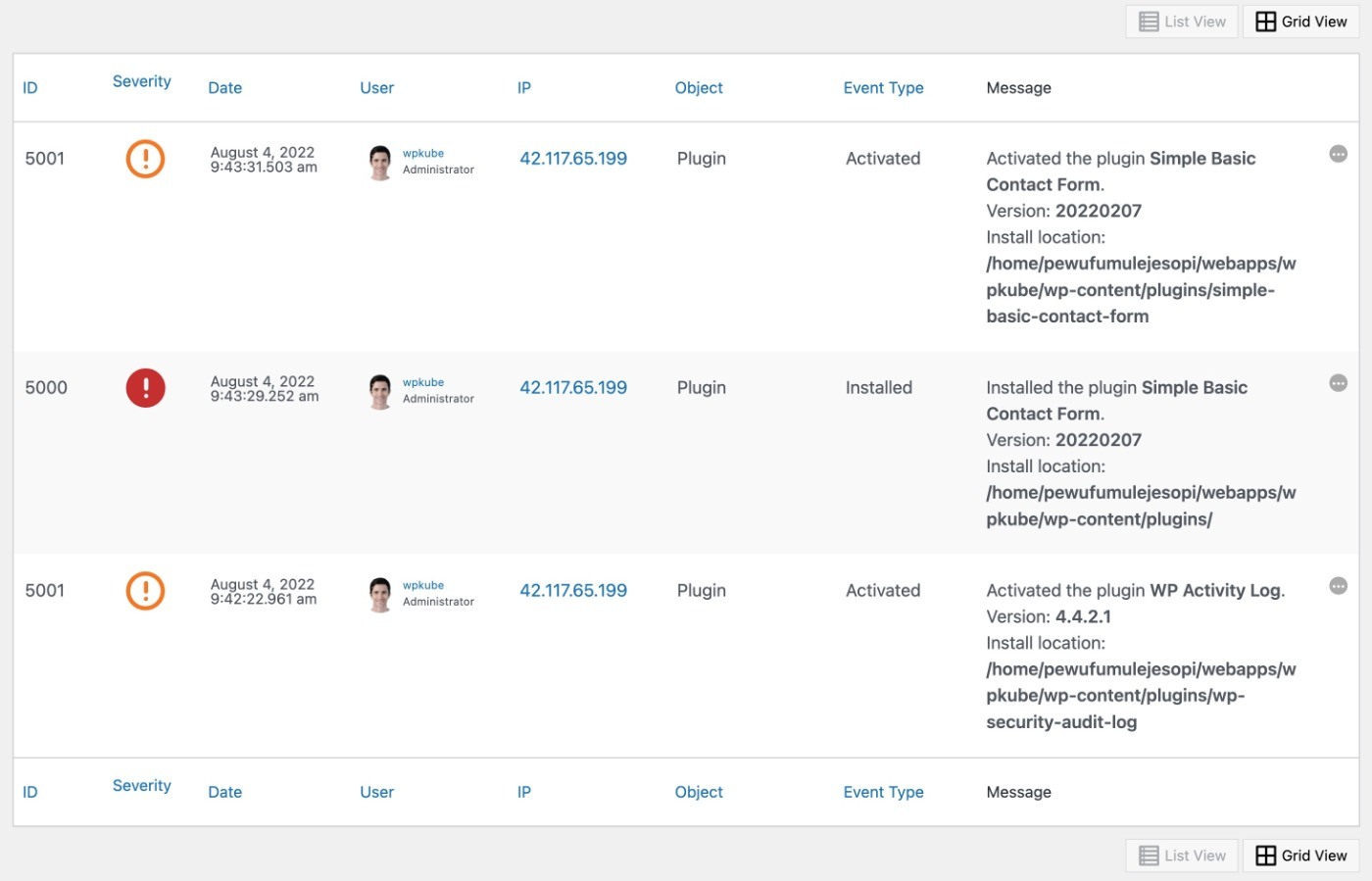
To set this up, you can use a plugin like WP Activity Log. We have a tutorial on how to set up activity logging, as well as an exclusive WP Activity Log coupon to save you some money.
14. Run Regular Malware/Security Scans
While your site shouldn’t experience any issues if you’ve implemented the best practices above, it’s still a good practice to periodically run malware/security scans on your site.
To check for any issues on the frontend of your site, you can use the free Sucuri SiteCheck tool.
To run a full scan of your server’s files, you can consider tools such as MalCare or Wordfence.
Your WordPress host might also run its own daily malware scans, which might make these tools redundant.
15. Disable XML-RPC
XML-RPC helps external tools connect to your WordPress site, such as the desktop WordPress app.
However, if you’re not using these tools, it just adds an unnecessary attack vector to your site. To fully disable it, you can use the free Disable XML-RPC plugin.
16. Block Hotlinking
Hotlinking is when someone embeds content from your server on their site (e.g. an image). It can affect your site’s security by draining your server’s resources without your permission.
To block hotlinking, you can add some code to your site’s .htaccess file.
To generate the .htaccess code needed to block hotlinking, you can use this free tool. It will let you safelist certain hotlinking providers (like Google Image Search), while blocking others.
17. Change WordPress Database Prefix
Changing the WordPress database prefix adds a small amount of “security by obscurity”, though some experts (including Wordfence) say that the security benefits are pretty trivial.
If you have an existing WordPress site, I don’t recommend doing this because the risks of breaking your site outweigh any potential security benefits.
However, if you’re setting up a new WordPress site, you might as well use a custom database prefix, even if it doesn’t have a huge effect.
18. Disable PHP File Execution in wp-content/uploads Folder
You can block some edge case attacks by disabling PHP file execution in your wp-content/uploads folder.
Here’s how:
- Use Notepad to create a new .htaccess file.
- Add the code snippet below.
- Upload that file to the wp-content/uploads folder.
<Files *.php>
deny from all
</Files>
19. Disable In-Dashboard Code Editing
By default, WordPress lets you edit theme and plugin files from the WordPress dashboard, which would let an attacker add malicious code if they ever got access to an Admin account.
To prevent this, you can disable file editing by adding this snippet to your wp-config.php file:
define( 'DISALLOW_FILE_EDIT', true );
WordPress Website Security FAQs
To finish things out, here are a few common questions about WordPress security.
Does WordPress have security issues?
WordPress itself doesn’t have security issues, but installing plugins on your site can introduce security vulnerabilities, especially in the case of poorly coded and/or maintained plugins.
Is WordPress easily hacked?
The vast majority of WordPress sites get hacked because of user error, not because of the software itself. Following some essential security best practices will make your site very difficult to hack.
Can you make WordPress secure?
Yes absolutely. As long as you follow best practices, WordPress can be very secure. There’s a reason that so many major brands trust WordPress.
Do you need a WordPress security plugin?
You can create a secure WordPress site without a comprehensive security plugin. However, these plugins can simplify the process of implementing security hardening best practices and give you access to useful features such as firewalls and security scanning.
Implement These WordPress Security Best Practices Today
If you take nothing else from this post, I hope that you implement at least the seven must-follow WordPress security tips from above.
If you do just those seven things, you can be confident that you’ll avoid 99.9% of security issues on your site.
If you want even better protection, you can continue on and implement all 19 tips on this list.
Do you still have any questions about WordPress security? Let us know in the comments!








Leave a Reply