

These days, where online crime is starting to overtake crime in real life, it’s important to learn how to protect yourself and your website, especially if your income relies on it.
Anyone with a website is a potential target, but anyone with a completely unchanged, standard version of WordPress (with the username admin and a generic password) has a big red bullseye plastered on their back, waiting for some lowlife to gain access and wreak havoc.
Why You Need To Scan Your Site
While it might seem like the first step to a safe website is to improve security to make sure noone gets the opportunity to do so in the first place, (we’ve already covered how you can easily improve your security by using a single plugin) your site could already have been hacked.
A person with bad intentions could already have access to your site, there could even be malware hiding out among your files as we speak. It’s possible that you are completely in the dark because you didn’t have the measures in place to alert you that something happened.
When people think of websites getting hacked, most likely they’ll get an image of a typical defacing in their heads. Defacing is when a hacker replace what was originally shown on the website with something else, usually a self-serving braggadocious flyer promoting their hacker pseudonyms.
But, a lot of the time when hackers get access to a website, they then choose to lay in wait for a while. They then discreetly start implementing some malware or other malicious scripts on the site. Bragging about gaining access is not their main intent, their intent is much worse than that.
They could be:
- Phishing for usernames, passwords, emails or other stuff you’d rather stay private.
- Making visitors download malware/trojans/viruses by injecting scrips on your website.
- Inserting code to do different things, for example set up a backdoor, or monitor user activity or steal input information from forms.
- Redirecting your visitors to a site with malware.
One of the reasons it’s important to do a proper check instead of just visiting your own website, is that the hacker could know your IP address, (or perhaps use the cookies for logging into the admin area) and have implemented code that shows only you the normal site as it should be, leading you to think that your site is okay, while in reality it could be ruining your reputation by having malware downloaded to visitors. (This can for example also lead to getting unindexed by Google and added to a list of sites that Google Chrome will warn you about visiting.)
So all this means that if you’re starting to implement WordPress security measures, it’s just as important to check and make sure that there’s no malware or other threats on your website already.
Scan Your WordPress Site For Malware & Threats
Below we go through a few different ways to find malware or other threats on a WordPress site.
Method 1: Use A ‘Site Checker’
These days, you can quickly and easily check for malware by using any of a number of free services.
But, you need to keep in mind that these services will check if your homepage, or other visible pages, include malicious scripts, or try to make visitors download malware.
Services to use:
These services are all easy to use. Simply type in your URL, click the Scan button, and presumably, the service does all the work for you and when it tells you you’re clean, you don’t have to worry anymore.
The problem with these services is that if the malware is on a hidden page (something you’re not able to reach through links, unlisted in the pageindex, for example the WordPress dashboard) it won’t be able to find it.
As Sucuri themselves put it: “Sucuri SiteCheck is a free & remote scanner. Although we do our best to provide the best results, 100% accuracy is not realistic, and not guaranteed.”
At the end of the day, a site checker like the ones mentioned above can be a good way to do an initial check if you suspect foul play on your site, but if you’re trying to clean your site in the aftermath of being hacked, leaving it at that is not a very good idea.
Method 2: Use A Scanning Plugin
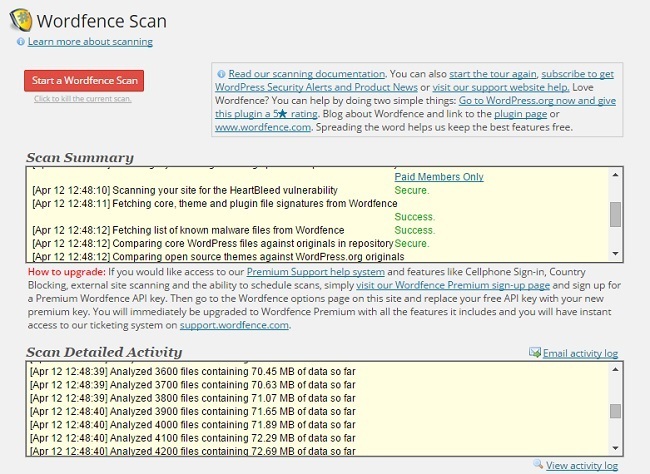
There are specific plugins that focus on this capability, but some WordPress security plugins, Wordfence for example, offer scanning capabilities as well. Typically these plugins look for known malicious code, but some also go the extra distance and compare the files of core WordPress, as well as themes and plugins, to the sources. Then if it finds any inconsistency, it will provide a coherent list
Wordfence settings automatically set it to compare core WordPress files against repository versions for changes, and has the option available to do the same for plugin and theme files. (This is highly recommended if you suspect your site might have been breached, and you either haven’t changed theme/plugin files, or are 100% aware of what changes you have made.)
There’s also the option to scan outside of your WordPress installation, which is a good idea if your WordPress site is mostly what should be on your domain in the first place.
You can find the options for scanning under Scans to include in the Wordfence options. For your first scan, I’d recommend that your options look like this:
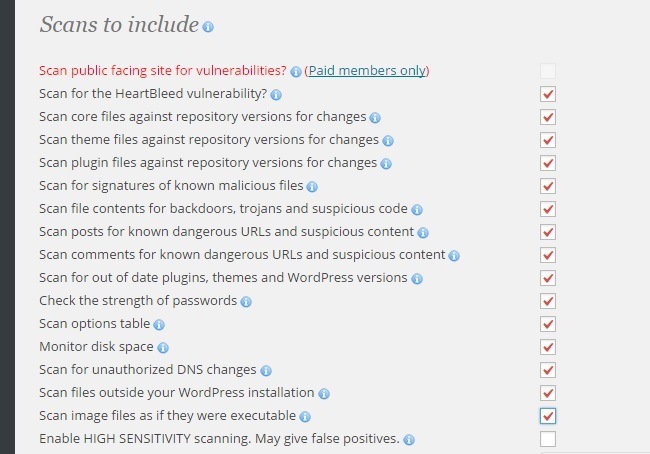
Depending on the volume of images on your site you might not want to scan image files as if they were executable.
A thing to note when you’re scanning theme and plugin files is that they might include logs or other files that will naturally change compared to the original files when you use the plugin. Plus, if you or your developer have made any changes to your theme’s core files, that will show up as warning as well. So don’t panic if your scan is showing warnings like the ones in the picture below.
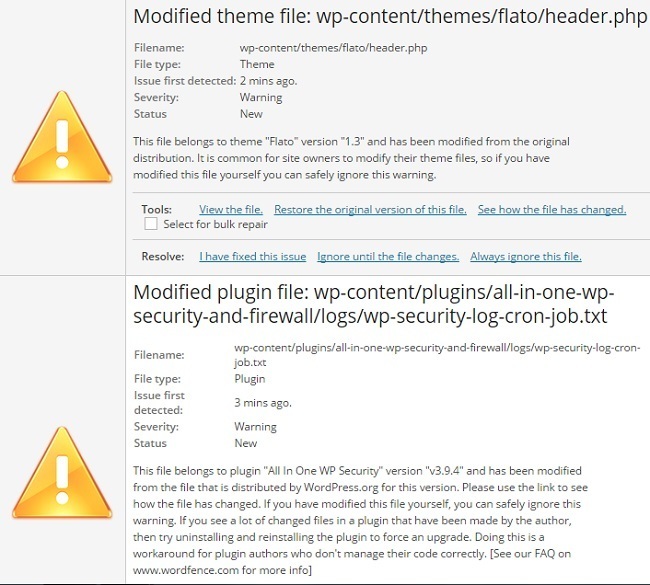
Take a closer look. If you can’t remember changing that particular file, or it doesn’t seem like the file would need to change with use.
Using Wordfence’s scanner is a good way to check if you have any malware or threats anywhere on your site. In fact, it’s the plugin I used to make sure that I’d completely cleaned up my site after an attack to one of my WordPress site a few months ago.
Another great thing is that it also gives you the option to sort out the files in question from within the WordPress dashboard, without having to bother with FTP or a file manage.
It seems like the only plugin that searches through all files, rather than a surface level malware search done using one of the web based scanners above.
Other scanning plugins you could use:
- Theme Authenticity Checker: A plugin checks any theme that you’ve installed for malicious code, and among other things, unwanted encrypted links in the footer or elsewhere.
Method 3: Do It Manually
The main technique of manually looking for malware in WordPress files, is simply looking for inconsistencies in the code and file size of your WordPress core and theme/plugin files and the repository files. A simple (but time consuming) way to check for malware, would be to download new copies of the core, your themes and plugins, and then comparing size and code individually.
If you keep the images you upload to your blog in a folder on your computer or on a cloud service like Dropbox, you can also check to see that the image sizes remain consistent.
Although if you don’t do any image optimization pre-upload, then the file sizes might have been changed in the process of uploading. The same goes if you use image optimization plugins. This way most image sizes will differ from the unuploaded versions whether there’s malware or not, so there’d be no way to differentiate.
The problem with this method is obviously how time consuming it is. For larger sites with decades of backlogs of visual content it’s just completely unrealistic to include images if you want to do it manually.
If you’re familiar with how to use one, you could use a scraper to collect most of the data and then compare it using spreadsheet or other software.
As for removal, just delete and replace the files in question.
Use A Plugin Or Service To Monitor Changes To Code or Files
To prevent anyone from sneaking in malicious code or malware, you can use a plugin or service to monitor changes to your code and files.
Sucuri not only takes note of these changes when done through WordPress, but immediately sends you an email whenever a file is changed, (along with whenever there’s been a failed, or of particular interest, successful login attempt). This allows you to react very quickly to any malicious changes to your website.
Then there’s services like Code Guard. These monitor any and all changes to files, the addition of new files, and send you regular, easy-to-digest reports. All you need to do is take a quick look, and if you see changes that you (or your staff) are not responsible for, then take a closer look at those files.
Conclusion
Scanning for malware and threats is a vital part of maintaining a secure and thriving website, and it’s absolutely necessary if your site’s security measures have been lax in the past. The good news is just how simple it can be.
We hope this tutorial helped you learn how to scan your WordPress site for malware and threats. While we are on the topic of WordPress security, you should check out our article WordPress Security 101.
Have you ever had a security breach on a WordPress site, or even, discovered malware and other threats? How did you find them? Let us know in a comment below.








you missed WordFence 🙂
ah.. seems like a great solution. Thanks for sharing, ovizii.
Wow, this is great. I have a web site too. So i can surely try this. I was not concern about it. This is a nice news for me.
Thanks for sharing.
That’s great to hear, Showrav. Thanks for stopping by.
Nice post!
Just a few days ago I had an attack due to malware and fortunately I was able to restore everything. Sucuri I was really help me.
Glad you liked the post, Fabrizio. Thanks for stopping by.
WOW I had no idea I should put an anti virus on my wordpress. Is there a way to see if there is already something set up for this? Also Do I just pick one I see that you have listed several here today Devesh? I did download the first one you mentioned above the wordpress anti virus, I Figured since this was the first one you talked about that it must be the best AM I correct to assume this? Thanks for sharing Chery 🙂
Hi Chery,
So glad to see you here, thanks so much for coming over and leaving a nice comment. All these are great plugins & services. The first one is fantastic and has a ton of features, so it’s good to know that you’re using the Antivirus plugin.
I would also advice you to check out other tools such as Sucuri & Exploit Scanner.
Have a great week ahead, Chery.
I’ve always suspected there could be more going on with themes. I only wish these could work for blogger. Do u have any ideas?
Yes, there’s a tool that suspects for malwars in themes. It’s called ‘Theme Authenticity Checker’ and I did included that in the post.
I’ve no idea about blogger. Haven’t used since 2009.
Thanks for stopping by, Rosemary.
Great information. This is one of those areas that is so easily overlooked, and yet it can bring us to a complete standstill – I know because my blog got hit last year. Thankfully I didn’t lose any valuable content, but it took me nearly 2 weeks to get everything completely back to “normal.” Now I’m probably overly protected, but at least I have peace of mind – well as much as you can have on the Internet these days 🙂
Hi Marquita,
So sorry to hear about that, Herald. I can only imagine what nightmare it may have caused to you & your blog.
yes – it’s much better to have overly protected blog, than waking up one day & knowing that your site has been hacked or infected.
Thanks so much for coming over here and sharing your insights.
Hi Davesh, I’d never considered that my blog would be exposed to malware – I’m glad that you brought it to my attention. Yes – I definitely want to save time and protect it before it’s too late. I appreciate all of the resources that you shared!
Dena Lynn
Hi Dena,
Glad you liked the resources and It’s good to know that you’re taking action before it’s too late.
Thanks for the nice comment, Dena. Have a great week ahead.
What about VaultPress?
I am not a big fan of VaultPress and never tested their service.
Hey Devesh,
WowWow, this is a great source for what is so important to keep the WP blog clean…. we can surely take a closer look to all your sources. It is not easy to find what you want and be safe to get it, but coming from you, it feels ok and for certain give a shot soon.
Thanks again for sharing.
nickc
Hi Nick,
So glad to hear that, thanks for the nice comment.
Nice tips here, Davesh.
I’m one of those people who rarely thinks about security, but I know I’m playing with fire.
My excuse is that I’m not “techie”, I suppose, but with plugins like these, all the tech headaches seem to dissolve.
Just one other thing I’m always leery about though, and that is how much of an overload on my blog it is to upload too many plugins, or which ones are less taxing on my blog than others.
Hi David,
Glad you liked the tips. I don’t think tech headaches can be dissolved easily, the best way to keep your blog secure is by taking a full backup every week. I have been doing this for last 12 months and it’s the only way to make sure you are on the safe side.
None of these plugins will going to have any big impact on your WordPress site.
Thanks for stopping by, David.
The podcast from the Securi guys is actually the “DradCast”…sorry to be that guy. DreadCast just makes it sound dark, which if they’re talking about viruses may be fitting 🙂
Haha DreadCast ;).
Thanks for pointing that out, John. Much appreciated.
Hi Davesh,
Thank you for enlightening us on how to protect out site, I will give the link of this article to my wemaster. Thanks again for showing us the way to do it and the names of the plug ins!
Hi Patricia,
That’s awesome to hear, can’t wait to read your wemaster post. Thanks for stopping by and leaving a nice coment.
Wow … I thought I was a real WordPress Geek and I have not heard or used and of these plugins that you have mentioned here. Fabulous share I salute you and I will be back here again. I found your site via the Biz Blogging community and I’m delighted I did. Have a great weekend and thanks again for this sharing, I appreciate it 🙂
Hi Sadie,
Thanks so much for coming over here and leaving a nice comment. I am so happy that I finally started engaging in communities like B3 ;).
Have a great week ahead.
Great article! We’re just about to release our automated security scanning tools at wpstatus, if anyone is interested, I’d love to get your thoughts on it. We do daily scans of WP sites and if malware is detected you get notified instantly.
Hi Devesh,
thank you so much for sharing these great ways of checking our blogs.
It is always good to have a recommendation on what to use.
I appreciate your overview of the tools you mention.
Cheers,
Yorinda
Thanks Devesh,
I will try the above mentioned steps on my site.
I have read some places there are few sites hacked and hard to backup.
This is great information, I will be keep visiting to your site for more good information.
Thanks
Pradeep
Due to this blog i am safe and i want to gives thanks to the writer of this post 🙂 You have a great blog …
Glad to hear that, Jagadish :). Thanks for the nice words, much appreciated.
Well, I would say Wordfence and Centrora Security are missed here, both have virus scanning function
Wordfence
http://wordpress.org/plugins/ose-firewall/
Centrora Security
http://wordpress.org/plugins/ose-firewall/
Cheers!
My favorite security plugin: Checksum Verifier / http://wordpress.org/plugins/checksum-verifier/
Since, i am new WordPress user. So i want to know and grab more and more information related to WordPress plugins and applications. Malware and Threats are quite dangerous for allWordPress site and i am facing it too on my blog.
Thanks to you, i got the several ideas for Scanning my WordPress Site For Malware And Threats. thanks again. Keep helping us.
April and May of 2015 saw a vulnerability caused be a wrong use of code outlined in the WordPress codex. I immediately implemented all the techniques outlined here. Out of 40+ sites I handle only one got hacked it was my own! True story
I’m having this problem, I like your article