

So, you’ve spent countless hours crafting informative, entertaining, and all-around high quality content for your blog. You’ve also developed a loyal audience that has come to expect blog posts from you on a regular basis by using all the best WordPress tools out there you can.
Only, you want to take a vacation. Or appeal to those in different time zones. Maybe you manage multiple websites. Or simply have so much other work that needs to be done that you cannot literally sit down and write out word-for-word every blog post at the exact time you wish to publish it.
So what do you do?
You schedule your posts ahead of time in the WordPress dashboard that’s what!
Now you can sit back and enjoy that plane ride to the Bahamas (nice right?), or enjoy an extra hour of sleep without your global readers missing their favorite morning blog post, or you can finally catch up on that admin work you have been putting off forever.
Right?
When WordPress Delivers a Low Blow
In an ideal world, scheduling your website’s blog posts ahead of time is a fool-proof way to never miss regularly scheduled posts that all of your readers have come to enjoy. But, sometimes WordPress gets a little confused and after that 2 week vacation that you fully prepared for beforehand, so that none of your website’s posts would skip a beat, you realize everything was a mess while you were away.
In fact, you come to realize that none of your scheduled posts were published according to the schedule you had set and that while you were away, so was your content, leaving your readers to wonder,
“Where did he go?”
And to make matters worse, WordPress never notified you that something was missing. So, had you just been catching up on your admin work and checked your website regularly, you might have noticed after the first one or two missed posts that something was off.
But while on vacation, where WiFi is sketchy and quite honestly, you were enjoying the great food, salty sea air, and swimming with the dolphins, you never even thought twice about your perfectly set up website. Little did you know, while you were far away on vacation, your blog was turning into a ghost town.
Low blow WordPress, not fair.
WordPress Missed Schedule Error
When your scheduled WordPress post does not get published properly, your dashboard will give you the ‘Missed Schedule Error’.
This means that while you were away, despite setting up your post to publish at a specific time, it did not. This can happen for a number of reasons, although the most common reason I found was due to a failed cron job.
Cron Jobs
In a nutshell, a cron job is a task that is set to run at a specified interval that will be executed regularly, automatically, and without human intervention. The user must set the program up to occur and the cron job takes over from there.
Cron jobs can be scheduled to run at fixed times, dates, or intervals, and include actions like automatic backups, deletion of temporary files, and even scheduling of WordPress posts ahead of time to publish at a future date. This is especially useful for repetitive tasks that you do not want to hassle with manually setting up every single time.
Yet, like I mentioned before, WordPress likes to have a mind of its own at times and can fail to execute your cron jobs as specified.
WordPress Cron Jobs
As explained in detail by Tom McFarlin, WordPress cron jobs are what he deems “faux cron jobs”. Typically, when a cron job is set up within an operating system, the server is set to execute that job at the required interval regardless of whether anyone is at the computer or not.
With WordPress cron jobs however, things work a little differently. When a cron job is set, it’s scheduled and then written to the database. Then, when a user clicks on the website, the cron job scans the system checking for any scheduled tasks and executes them.
Notice the issue?
If one of your website visitors does not visit your website right before a scheduled post is set to publish, your post will not execute as planned and you will find a ‘Missed Schedule Error’ the next time you log into your WordPress dashboard.
For those of you that have well trafficked websites this may never pose as a problem. However, if you have many cron jobs set up that must execute very regularly, or your website traffic is hit and miss at times, you will find yourself with many failed cron jobs.
Don’t worry though, there is a relatively simple solution for preventing these types of mishaps from happening again. You are saving for that next vacation right? Maybe a cruise this time?
Fixing the WordPress Missed Schedule Error
The easiest way to fix the missed schedule error in your WordPress dashboard is to use a nifty plugin called WP Missed Schedule. Here’s a look at some of the features WP Missed Schedule provides website owners:
- No decrease in server performance, even while checking for internal WordPress cron jobs
- Missed schedule posts are the only cron jobs checked so no resources are wasted
- Any scheduled future posts stored in the database will be found and fixed by WP Missed Schedule using an index table for queries
- Full compliance with hyper db table query formatting
- Repair of 10 items each session, every 15 minutes to remain compatible with WordPress default feeds syndication
- Designed for simple or heavy use of WordPress scheduled future posts
- Compatible with popular WordPress plugins such as W3 Total Cache and Jetpack
- Automatic configuration
Let’s take a look at how to install and set WP Missed Schedule to avoid the costly mistake of not providing your readers the content they want.
Step 1: Install and Activate WP Missed Schedule
The first thing you’ll need to do is download the WP Missed Schedule plugin from GitHub, a hosting service used by open source developers and projects.
To start, go to WP Missed Schedule’s repository on GitHub. On the main page of the repository, click on the green clone or download button. Then, click on the Download ZIP button.
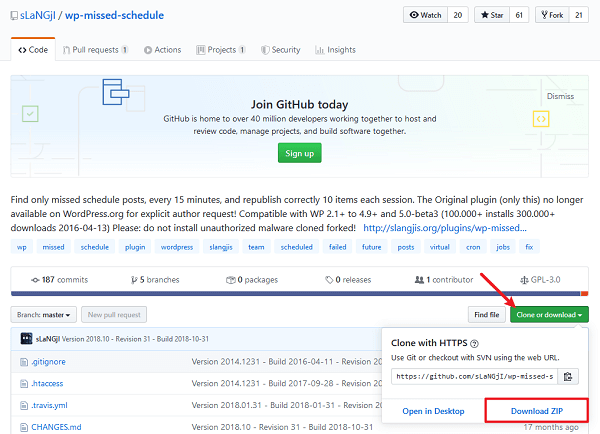
When you do this, you’ll be prompted to save the zip file. Save it somewhere you can access later when you log into your WordPress dashboard.
Log into your WordPress website and head to the admin area. From there, go to Plugins > Add New. When there, click the Upload Plugin button.
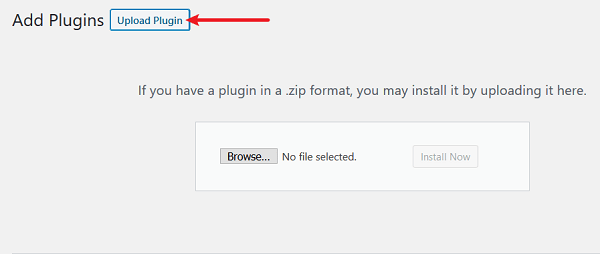
This will show you the option to upload the plugin’s zip file. Click Browse to find the zip file you saved and then Install Now.
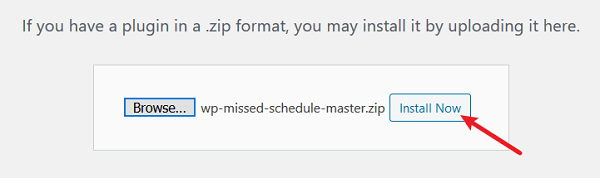
Lastly, click Activate Plugin to make WP Missed Schedule active on your website. You will now see WP Missed Schedule in your list of installed plugins.
Step 2: Check for Missed Schedule Posts
Now that WP Missed Schedule is activated and working on your site, you can check the posts that were scheduled that would have been considered “missed” had the plugin not caught the fail beforehand and corrected it.
To do this, go to Plugins > Installed Plugins and scroll down to WP Missed Schedule. Then click on Miss and see what posts were corrected. This assures you that the plugin is working correctly.
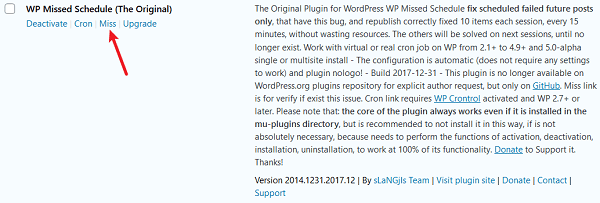
If everything is working the way it should, and all your scheduled posts are going live when they should, there will be no posts for you to see when you click Miss.
Step 3: Download WP Crontrol
In addition to using the WP Missed Schedule plugin, you have the option of downloading the plugin WP Crontrol to coordinate with WP Missed Schedule. This plugin, when activated on your WordPress website, let’s you view and control what is happening in the WordPress cron system.
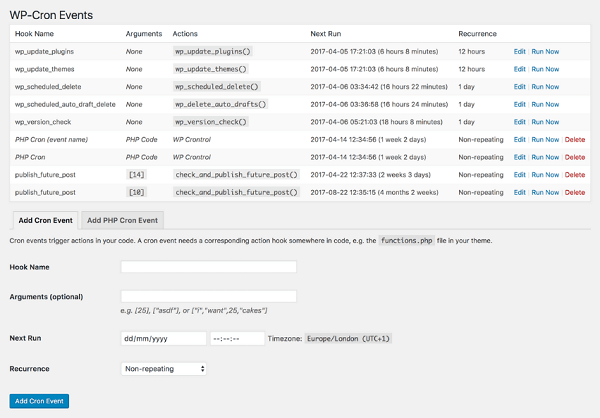
For example, from the admin panel you can:
- View all cron events and their associated details
- Edit, delete, or immediately run any cron events
- Add new cron events
- Bulk delete cron events
- Add, edit, or remove custom cron schedules
The admin screen will also show you a warning sign if your cron system seems to be malfunctioning. For example, if your server cannot connect to itself or fire scheduled cron events, you’ll see a notification.
Step 4: Enjoy Your Vacation, Extra Hour of Sleep, Admin Day, Whatever!
That’s it! After activating WP Missed Schedule your website is ready to check for failed cron jobs at all times. Remember, while you can check to make sure the plugin is working, you don’t have to do anything. WP Missed Schedule works automatically.
Final Thoughts
Consistently providing your website visitors with high-quality content is the key to maintaining and growing a successful website. Sometimes we cannot be at our computers, logged into our WordPress website, and providing a live feed of information to our readers. That’s why WordPress has provided us with the solution of scheduling our content for future dates and times.
Though, as with anything in the world, things are not perfect and tend to go awry causing us frustration and costing us loyal readers and maybe even revenue.
That’s why I suggest using a plugin like WP Missed Schedule to easily and automatically prevent your future posts from not publishing. Enjoy that vacation, get your beauty rest, catch up on work, or just do nothing. But don’t worry about your content not posting, at least not when WP Missed Schedule is in your arsenal of plugins.
Have you ever had the frustration of seeing the dreaded ‘Missed Schedule Error’ on your WordPress website? Have you tried using WP Missed Schedule or anything similar? I would love to hear all about it in the comments below!








I have been struggling with this issue for some time now, and I was hoping to get it fixed without adding a plugin, but I haven’t. So, your advice was perfect for me. I am going to test it tomorrow with my next post.
Thanks Devesh.
Hey Jens,
There is no easy way to fix this issue without using a plugin. It’s good to know that you will be using the “Missed Schedule” plugin.
Thanks for stopping by and enjoy your rest of the weekend.
I have just tested it, and it worked great 🙂
Thanks.
That’s great to hear, Jens. Glad I could able to help you.
Have a great week, ahead.
I’m pretty sure you can create a cron job within your server without the use of a plugin. I haven’t preformed this myself with this particular issue, but I have done this for many over things within WordPress. Maybe someone can elaborate more if they have.
I have been struggling with this problem on WordPress for a while now. This helps alot. Thanks for sharing!
So glad I could able to help you, Robert. Thanks for the nice comment.
Nice idea normally don’t know it missed the schedule until I still see it in the queue in the admin area.
This is great information. I schedule posts when I’m on vacation and I’ve never missed one yet, but now I’m concerned. Perhaps I should install this next time I travel to be sure I don’t have this issue?
Hey Carolyn,
Glad you liked the information and WordPress doesn’t always give the “Missing Schedule” error but when it does, it is really frustrating to see the error notification next to your blog post.
I am using it on WPKube and it works well. Thanks so much for stopping by, Carolyn.
Great stuff, worked like a charm. Thanks for sharing this valuable tip, very much appreciated..
Thanks dude for sharing about this plugin. Seceduled posts were not working on my blog but WP Missed Schedule Fix Failed Posts fixed my problem !! 🙂
Article is out of date and offers no real solution. Plugin doesn’t exist anymore.
Hi Pete,
Thank you so much for stopping by and reading my article. I am so sorry to see that the additional information I added to this article a small amount of time ago is out of date 🙁 I appreciate you bringing this to my attention. I would never want to offer no real solution to my reader’s and if it wasn’t for people like you helping authors like me out, we might never know about these kinds of things.
I did some quick research and from what I can tell there is no alternative solution to this error that I can find easily as of now. However, should I come across an alternative solution I will be sure to let you know. I know many people relied on the WP Missed Schedule plugin and are probably out of luck now that it has been discontinued.
Thanks again for stopping by and once again I am sorry for the outdated information. WordPress can change so quickly and it is difficult to keep up sometimes!
~ Lindsay 🙂
Thank you Lindsay,
It appears the plugin has been moved to github without much explanation. Do you have any knowledge of the direction it is taking and if you’d still install and use it on a new site with the current status change of no longer being in the repository? I’ve relied on this for years as we schedule posts all the time and now i’m not sure what to do next.
https://github.com/sLaNGjI/wp-missed-schedule
Thank you!
Karena
can you please give me miss schedule plugins download link?
Hey Paras,
The plugin is no longer available in the WordPress repository, but you should be able to download it from Github — https://github.com/sLaNGjI/wp-missed-schedule
The plugin is no longer available in the WordPress repository? Why?
Most likely cannot be bother to maintain it anymore. You can find it here:
https://github.com/sLaNGjI/wp-missed-schedule
Yet another plugin? This is ridiculous. So I download a plugin for a job and then another one to help the first one work. If every plugin on our websites would need another one to support it, where would we be?
Hey Anda,
That’s not how it is supposed to work. Can you let me know which plugin you’re referring to? OR if you are talking about missed schedule error, then only this plugin is required — https://github.com/sLaNGjI/wp-missed-schedule
Hi, the only official and original plugin of my team, WP Missed Schedule, is only available on GitHub https://github.com/sLaNGjI/wp-missed-schedule/ because the nightmare of WordPress.org repository, with spammers and lamer, and indifference of somes moderators in now inacceptable. Is this team that have explicit required this change, and this plugin is no longer available on WordPress.org repository for explicit author request, and no others motivations!
The plugin available on github is the same of the plugin of wordpress.org repository, same product, same plugin, same author, same team, and not another product or plugin: is the same product and plugin!
Other explanations are available on http://slangjis.org/plugins/wp-missed-schedule/ or here https://slangji.wordpress.com/blog/
Thanks for use and Support WP Missed Schedule 😉
sLaNGjIs Team
By 🙂